Software
GST Billing Software for Small Business in India: 2026 Buyer's Guide
GST billing software fixes this by creating correct GST invoices in seconds, calculating CGST, SGST and IGST automatically, and keeping your sales data ready for return filing. In 2026, with e-invoicing mandatory for businesses whose aggregate annual turnover crosses ₹5 crore, and a 30-day limit to report invoices for businesses at ₹10 crore and above, the right software is no longer a nice-to-have for a growing business.
For most small businesses in India, GST billing still eats hours every week. Invoices are typed in Excel or Word, tax rates are checked by hand, and at return time someone has to match every bill against the books. One wrong HSN code or tax rate can mean a mismatch in GSTR-1, a notice, or a delayed payment from a customer.
GST billing software fixes this by creating correct GST invoices in seconds, calculating CGST, SGST and IGST automatically, and keeping your sales data ready for return filing. In 2026, with e-invoicing mandatory for businesses whose aggregate annual turnover crosses ₹5 crore, and a 30-day limit to report invoices for businesses at ₹10 crore and above, the right software is no longer a nice-to-have for a growing business.
This guide explains what good GST billing software should do, what it costs, and how to choose one that fits your business today and as you grow.
Manual Billing vs GST Billing Software
TaskManual (Excel / Word)GST billing softwareCreating an invoice5–10 minutes, typed by handUnder a minute, from saved items and customersTax calculationChecked by hand, easy to get wrongCGST, SGST and IGST applied automatically by place of supplyHSN / SAC codesLooked up every timeSaved once with each product or serviceE-invoicing (IRN, QR code)Separate upload to the portalGenerated from the same invoice, where supportedPayment trackingSeparate register or memoryReceipts, advances and dues linked to each invoiceReturn filingSales data collected manuallySales reports ready to export for GSTR-1Business insightHard to see totalsLive sales, tax and outstanding reports10 Must-Have Features in GST Billing Software
[Featured image / infographic yahan lagao: gst-billing-software-guide-2026.png]
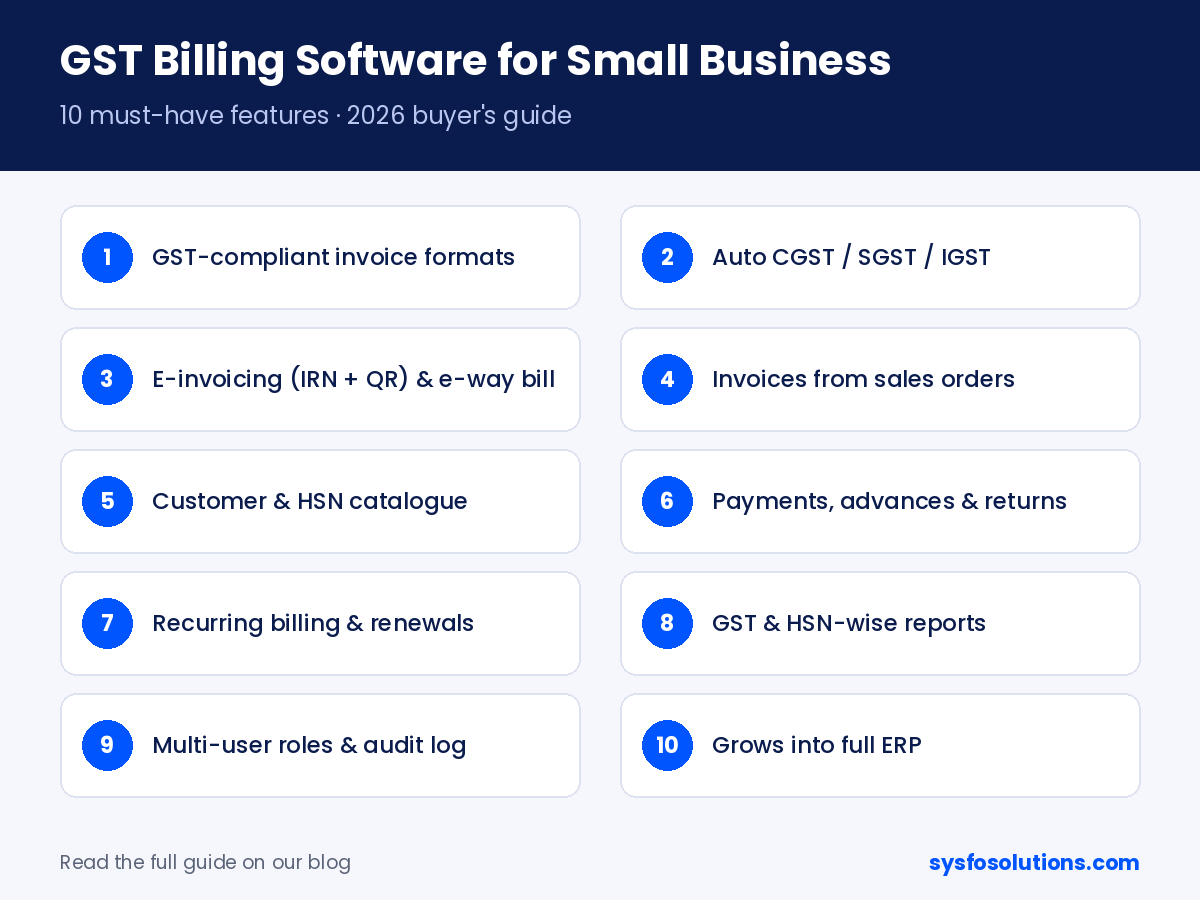
GST-compliant invoice formats. Tax invoices, bills of supply, credit and debit notes, with GSTIN, HSN/SAC codes and tax breakup printed correctly.Automatic tax calculation. The software should pick CGST + SGST or IGST based on the place of supply, so you never apply the wrong tax.E-invoicing and e-way bill support. If your turnover crosses the e-invoicing limit, generating the IRN and QR code from the same screen saves a lot of double work.Invoices from orders, not retyped. Create quotations and sales orders first, then turn them into invoices, including part-invoicing when you deliver in stages.Customer and product catalogue. Save customers, GSTINs, prices and HSN codes once, and reuse them on every bill.Payments, advances and returns. Record receipts, part payments, advances and sales returns against each invoice, so you always know who owes what.Recurring billing and renewals. For AMC, subscription or service businesses, invoices that repeat monthly or yearly should be created automatically.GST and sales reports. Tax summaries, HSN-wise sales and outstanding reports that your CA can use directly for return filing.Multi-user access with roles. Sales, accounts and owners should each see only what they need, with a record of who changed what.Room to grow. Look for billing that connects to expenses, purchases, HRMS and inventory later, so you don't have to switch software as you grow.Sysfo's GST Billing & Invoicing Software covers these essentials and is part of Sysfo ERP, so you can add more modules when your business needs them.
How Much Does GST Billing Software Cost?
GST billing software in India is sold in three main ways. The right one depends on how many people use it and how much you want to customise.
Pricing modelHow it worksBest forFree or freemium appsBasic invoicing free, paid plans unlock reports, users or e-invoicingVery small shops just starting outYearly subscription (SaaS)Pay per year or per user; hosting and updates includedSmall businesses that want quick setupOne-time licence + customisationPay once for the software, set up with your branding and workflow; yearly support optionalGrowing businesses with their own process, or ones that plan to add ERP modulesWhen comparing prices, check what is included: number of users, e-invoicing, data backup, support and future updates. A cheap plan that charges extra for every user or report can cost more within a year.
How to Choose the Right GST Billing Software: A 7-Point Checklist
Does it match how you sell? Retail counter, B2B orders, services or subscriptions all need slightly different invoicing.Is it ready for e-invoicing? Even if you are below the limit today, choose software that can generate IRNs when you grow.Can your CA use the reports? Ask for a sample GST summary and HSN-wise sales report.Is your data safe and yours? Check backups, user permissions, and whether you can export all your data any time.Will it grow with you? Purchases, expenses, inventory and HRMS should be add-ons, not a new system.Is local support available? Quick help in your language and time zone matters during return filing week.Can you try it first? Always ask for a live demo with your own sample invoices before you pay.Frequently Asked Questions
Is GST billing software mandatory for small businesses? No law requires you to use software, but your invoices must follow GST rules. Once your aggregate annual turnover crosses ₹5 crore, e-invoicing becomes mandatory, and doing that without software is slow and error-prone.
Can I generate e-invoices from GST billing software? Yes, if the software supports e-invoicing. It sends invoice details to the Invoice Registration Portal and prints the IRN and QR code on your invoice, so you don't have to upload invoices separately.
What is the time limit for reporting e-invoices? Businesses with an aggregate annual turnover of ₹10 crore or more must report each invoice to the IRP within 30 days of the invoice date. Check the latest GST notifications or ask your CA, as rules can change.
Can GST billing software file my GST returns? Most billing software prepares your sales data and GST reports for GSTR-1 and GSTR-3B. Your CA or tax filer then reviews and files them on the GST portal.
Can I use the same software for billing and other business work? Yes, if you choose billing that is part of an ERP. With Sysfo ERP, GST billing connects with enquiries, proposals, expenses, HRMS and helpdesk, so all your business data stays in one place.
See GST billing on your own invoices
Tell us how you bill today, and we'll show you Sysfo's GST Billing & Invoicing Software set up with your own sample invoices. Sysfo has built business software since 2005, with fixed, transparent pricing and support from our team in Lucknow.
Get a free demo →