Webmail Client Software Modern webmail for the mail server you already own.

A fast, beautiful, Gmail-style inbox that plugs into any IMAP, POP3 and SMTP server — branded as yours, hosted on your infrastructure, with your mail never leaving your server.

  • Works with any mail server
  • White-label per domain
  • Real-time push
  • One-click Windows installer
Webmail Client Software — MailFlow — Inbox screen Enlarge
0 emails stored in our database — mail stays on your server
3 built-in themes: Light, Dark and Glass
18 interface languages, incl. 9 Indian languages
1-clickWindows installer with IIS reverse proxy

Why MailFlow

Give your users the inbox they expect — without moving their mail.

Most hosting panels still ship webmail that looks and feels a decade old. MailFlow replaces it with a modern, responsive experience on top of the mail server you already run. No migration, no new mailboxes, no lock-in.

For hosting providers

  • Replace dated webmail with a premium experience customers notice
  • White-label per domain so every client sees their own brand
  • Runs beside your panel on the same server, talking to mail over localhost

For businesses

  • Keep full data ownership — no third-party cloud mailbox
  • A familiar, fast interface that needs zero training
  • An admin console to manage users, roles and access

Connects to anything

Any RFC-compliant IMAP / POP3 / SMTP server. Auto-discovery finds the right hosts, ports and encryption from just an email address.

Private by design

Mailbox content is streamed live from your server and never copied. Credentials are encrypted with AES-256-GCM.

Your brand, every domain

Each client domain gets its own name, logo, colours and support address — perfect for hosts and resellers.

Also included

Compatible with any standard mail server

  • cPanel
  • Plesk
  • DirectAdmin
  • CyberPanel
  • HestiaCP
  • hMailServer
  • Exchange (IMAP)
  • Dovecot
  • Postfix
  • Courier
  • HostConsole

If it speaks standard mail protocols — IMAP, POP3 and SMTP over SSL/TLS or STARTTLS — MailFlow works with it.

The inbox

Everything your users do all day, made effortless.

A clean three-pane layout with folders, a fast message list and a reading pane. Keyboard shortcuts, drag-and-drop and instant search keep power users moving.
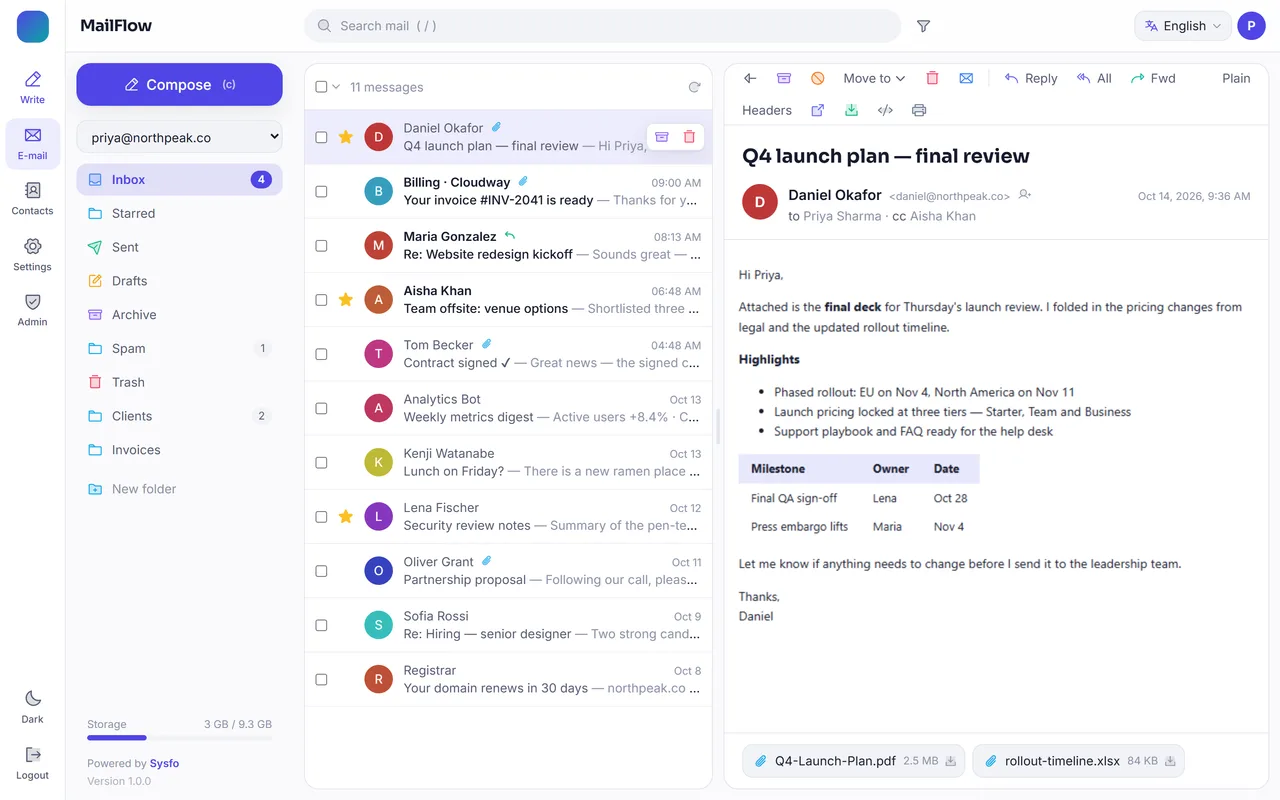
Webmail Client Software — Inbox screen Enlarge
Three-pane inbox — folders, message list and reading pane with attachments.

Reading & finding mail

  • Real-time push — new mail appears instantly via IMAP IDLE, with desktop notifications
  • Server-side and advanced search by sender, subject, date and more
  • Folders your way — create, rename, delete and drag messages between them
  • Bulk actions — read/unread, star, archive, spam, move and delete

Handling messages

  • Safe HTML viewing — sanitised, sandboxed rendering with remote trackers blocked
  • Attachment preview and download, print, view headers or source, save as .eml
  • Pop-out windows to read several messages side by side
  • Storage meter showing live mailbox quota usage

Write & connect

A composer that works the way people write.

A docked, Gmail-style composer with rich text, signatures and templates — plus a built-in address book that autocompletes as you type.
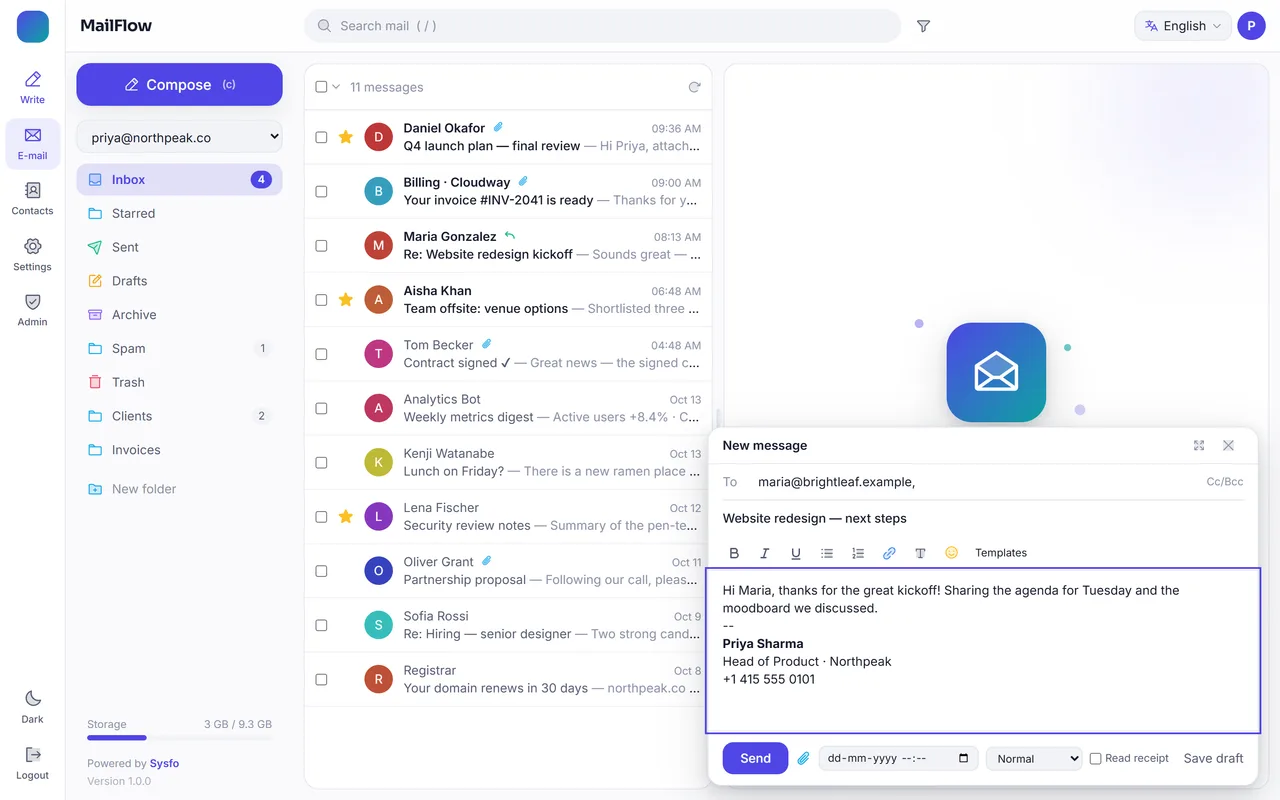
Webmail Client Software — Compose screen Enlarge
Docked composer with rich text, signature, templates, schedule send and read receipts.

Composer

  • Rich text formatting, links, lists and emoji
  • Signatures and templates inserted automatically or in one click
  • Drag-and-drop attachments and recipient autocomplete
  • Schedule send, priority flags and read receipts
  • Reply, reply-all and forward with the original quoted cleanly

Contacts

  • A searchable address book with one-click compose
  • Autocomplete from contacts as you type a recipient
  • Name, company, email and phone on every card

Keyboard first

Press c to compose, / to search and ? for the full list of shortcuts.

Signatures & templates

Per-account signatures and reusable templates for the replies people send every day.

Schedule send

Write now, deliver later — plus priority flags and read receipts.

Address book

Contacts one click from a new message.

Every contact card opens a compose window addressed to them — and the same address book powers recipient autocomplete in the composer.
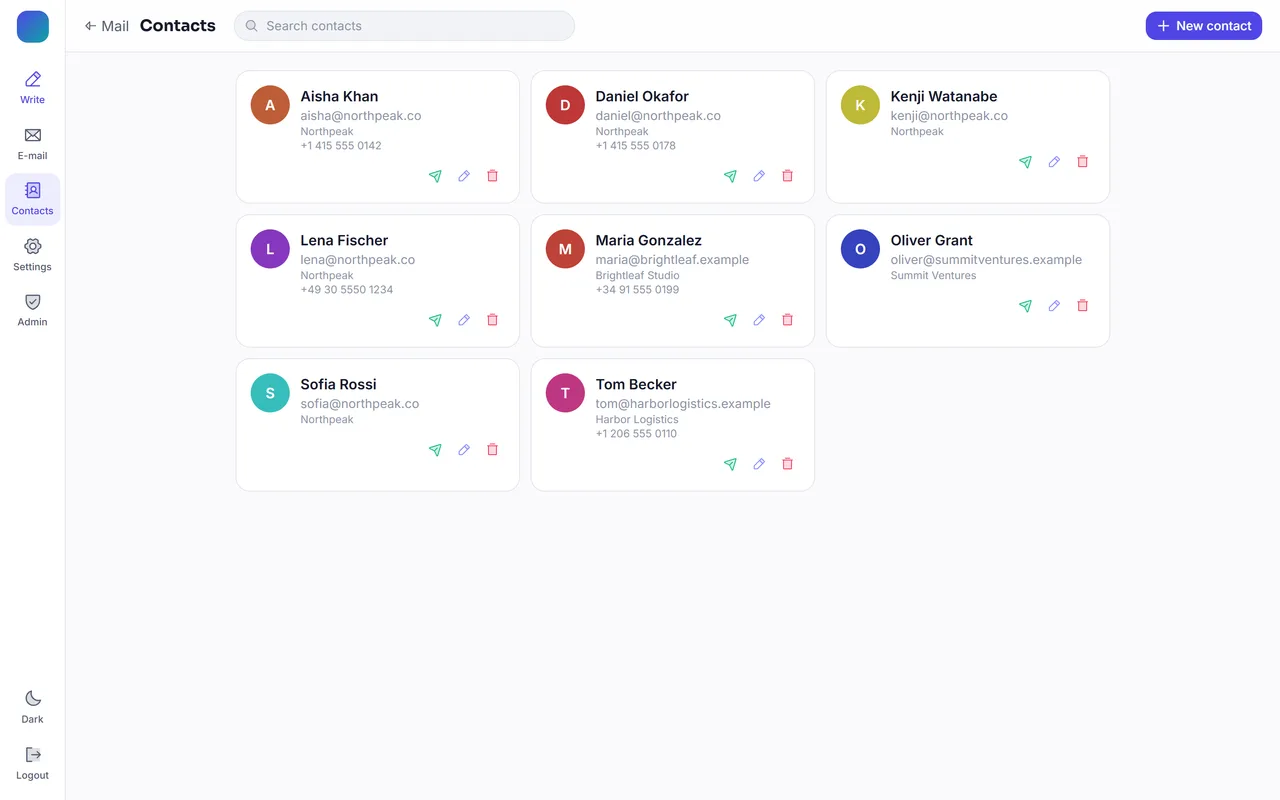
Webmail Client Software — Contacts screen Enlarge
Contacts — a searchable address book with one-click compose.

Look & feel

Beautiful in any light, on any screen.

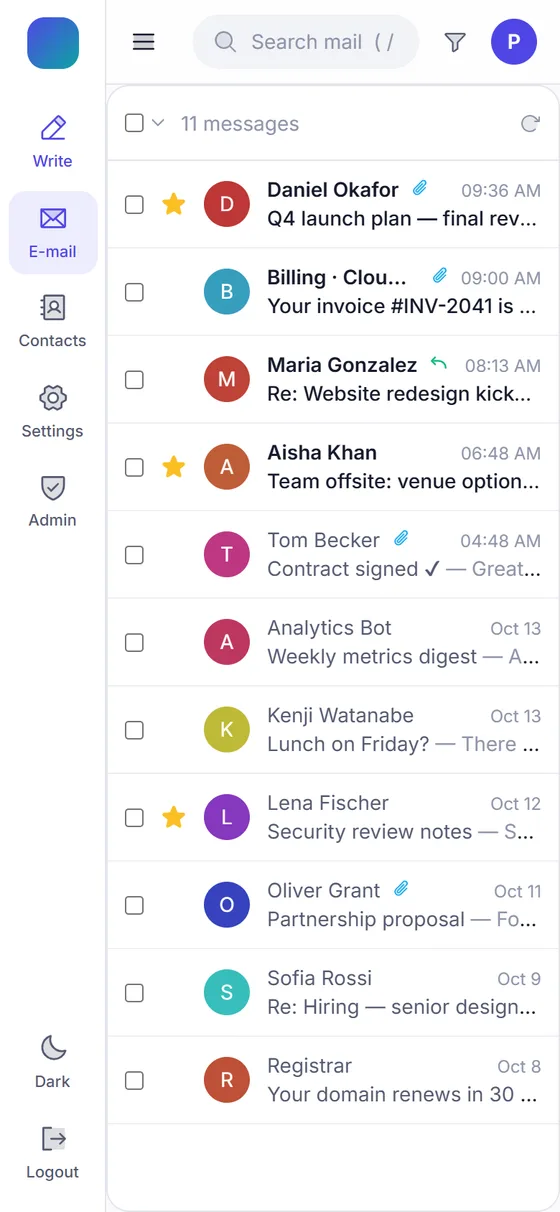
Users switch between Light, Dark and Glass themes instantly. The layout adapts from wide desktop monitors down to phones, so the same webmail works everywhere.
Made for every user

  • Three built-in themes, with each user’s preference saved to their profile
  • Responsive layout — collapsible sidebar and touch-friendly lists on phones and tablets
  • Comfortable or compact density and optional message snippets
  • Keyboard shortcuts for power users — press ? for the full list

18 interface languages

  • English, Hindi, Bengali, Tamil, Telugu and Marathi
  • Gujarati, Punjabi, Kannada and Malayalam
  • Spanish, French, German and Portuguese
  • Arabic, Chinese, Russian and Japanese
Webmail Client Software — Mobile screen
Responsive on mobile — the same inbox on a phone.

Dark theme

Easy on the eyes after dark.

A full dark theme across the inbox, reader and composer — switched in one click from the sidebar.
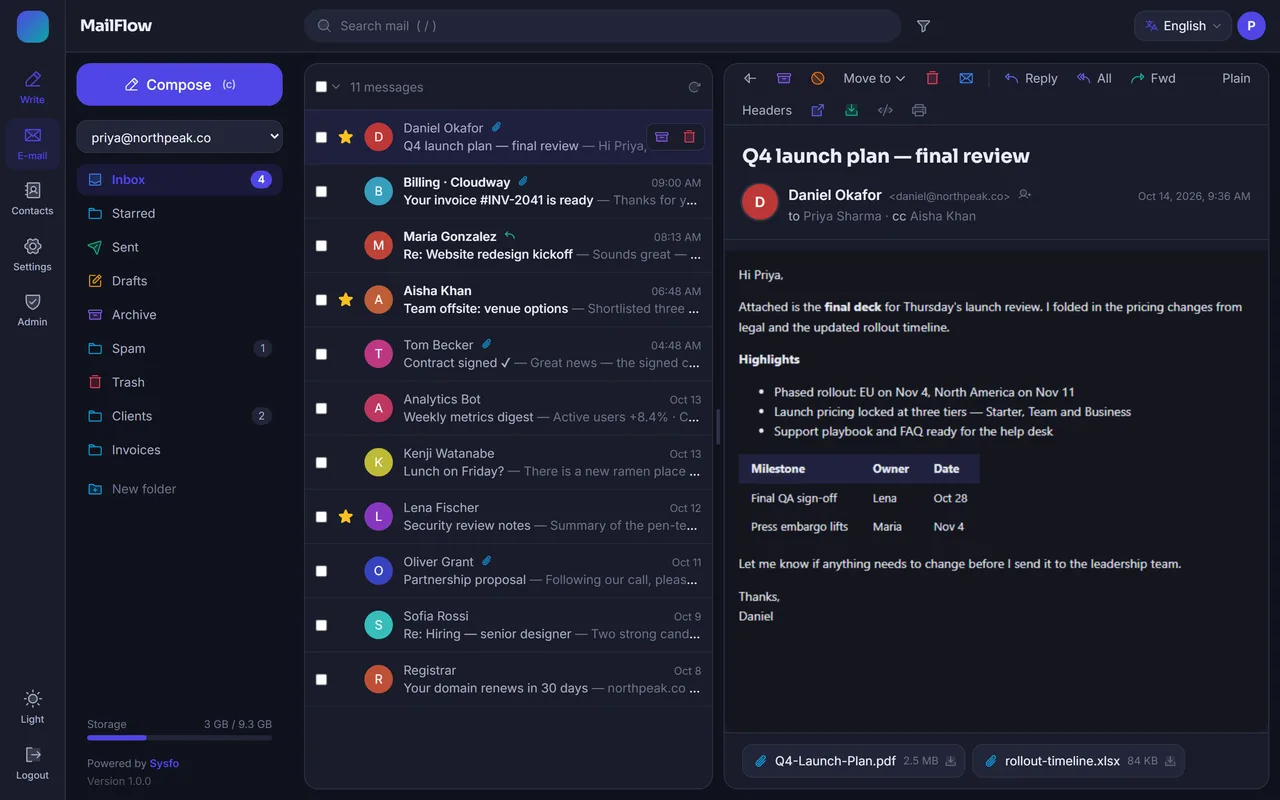
Webmail Client Software — Dark theme screen Enlarge
The Dark theme — the whole inbox, reader and composer.

Glass theme

A translucent Glass theme for a premium feel.

The third built-in theme gives the inbox a frosted-glass look — the kind of polish your customers notice the first time they sign in.
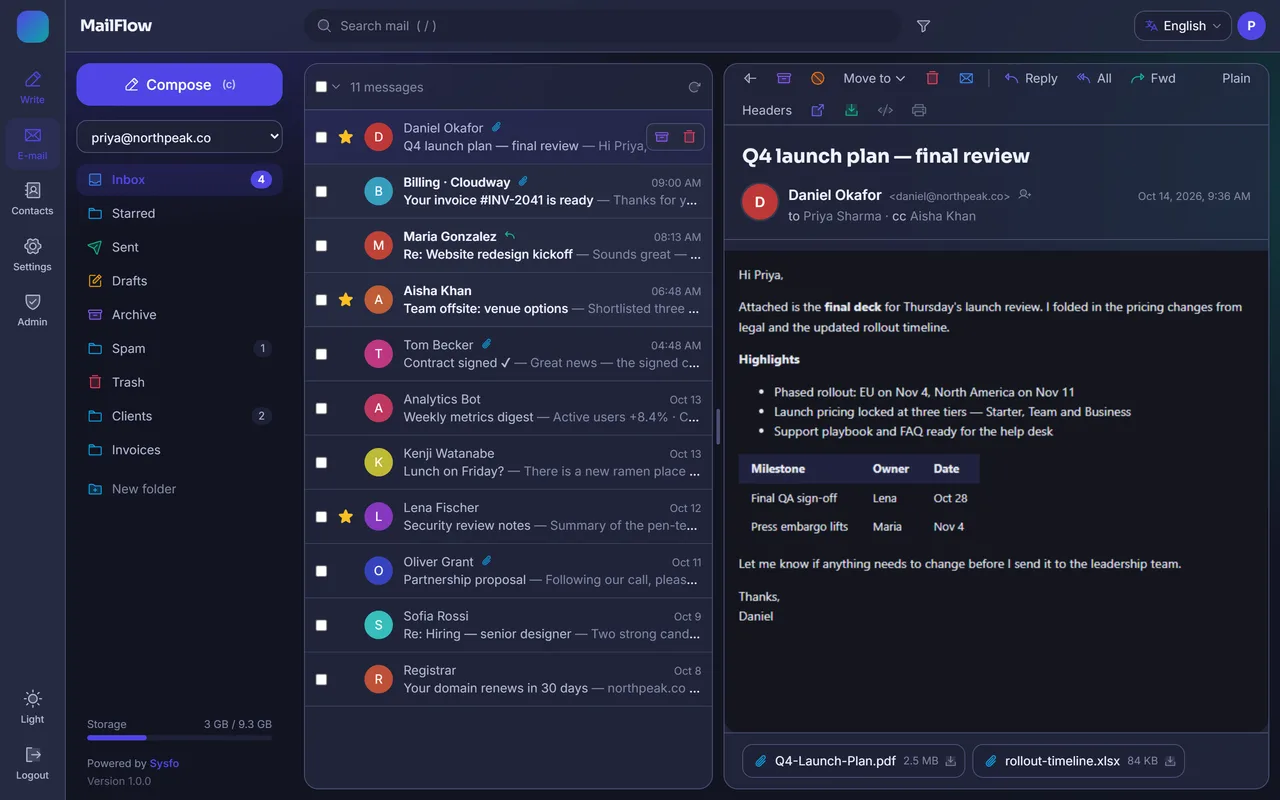
Webmail Client Software — Glass theme screen Enlarge
The Glass theme — frosted panels over a soft background.

Administration & white-label

One installation. Every client’s brand.

Admins add a domain, upload a logo and pick colours. Visitors on that domain instantly see their own branded webmail — name, logo, accent colours and support email.
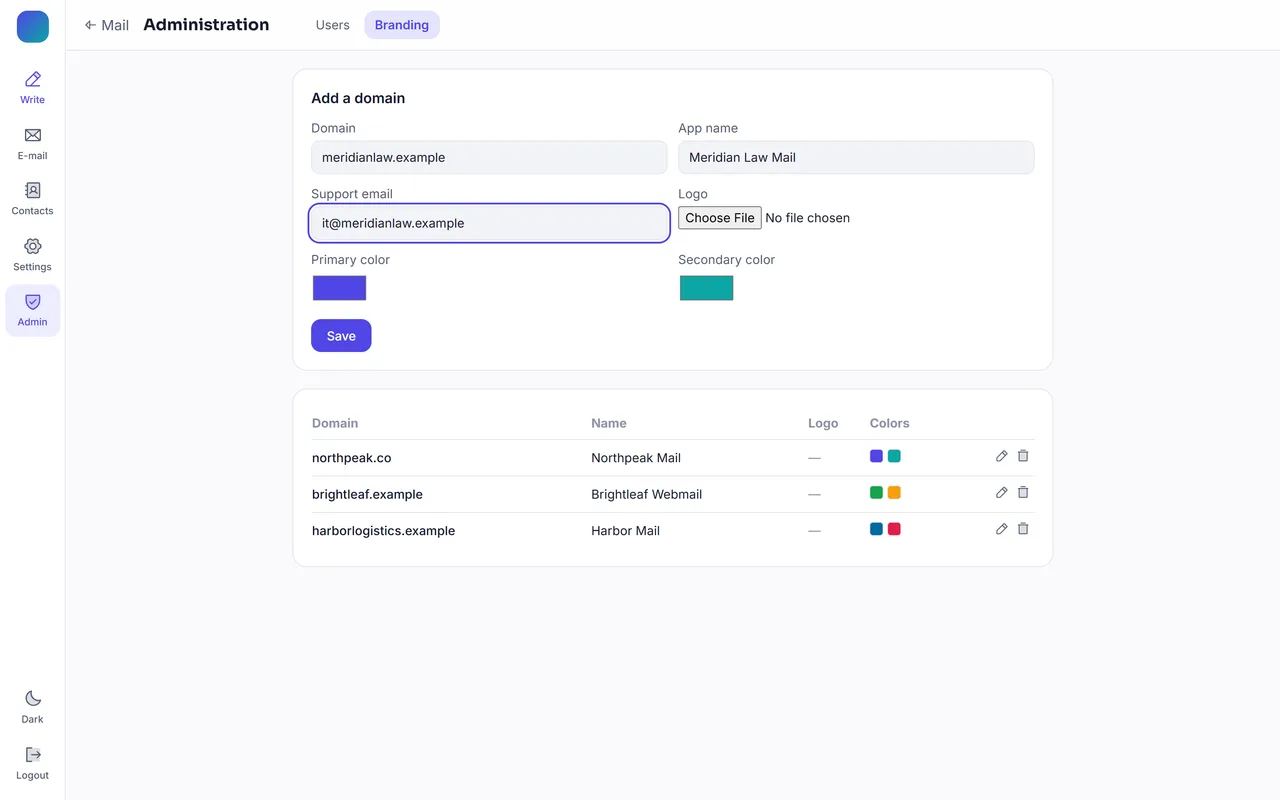
Webmail Client Software — Administration — Branding screen Enlarge
Per-domain branding profiles — app name, logo, support email and colours for each client domain.

Administration

  • Per-domain branding profiles — name, logo, colours and support email
  • User management — promote admins, disable accounts instantly
  • Session control — users can see and sign out of any active device
  • Panel-ready — designed to sit behind a hosting panel as its default webmail

Accounts

  • 3-step account wizard — identity, servers (auto-detected), then a live connection test
  • Multiple mailboxes per user, with a quick account switcher
  • IMAP or POP3 incoming, with SMTP for sending

Guided account setup

Connect a mailbox from just an email address.

The wizard auto-detects incoming and outgoing servers, ports and encryption, then runs a live connection test before anything is saved.
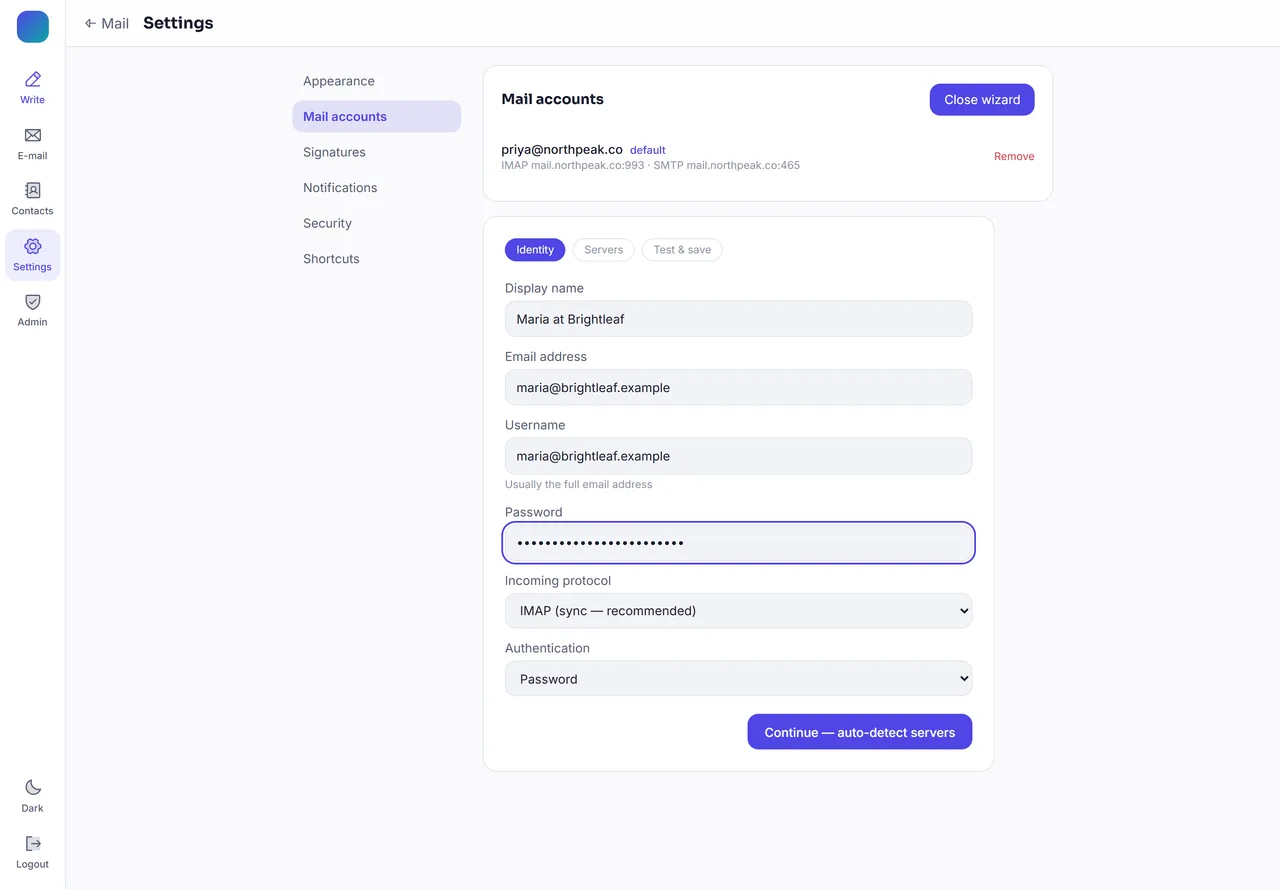
Webmail Client Software — Settings — Mail accounts screen Enlarge
Guided account setup with auto-discovery — identity, servers, then a connection test.

User management

Promote admins and disable accounts instantly from the admin console.

Session control

Users see every active device and can sign any of them out.

Multiple mailboxes

Several mailboxes per user, with a quick account switcher.

Admin console

Manage users, roles and access in one place.

The admin console lists every user, their role and status — promote an admin or disable an account in one click.
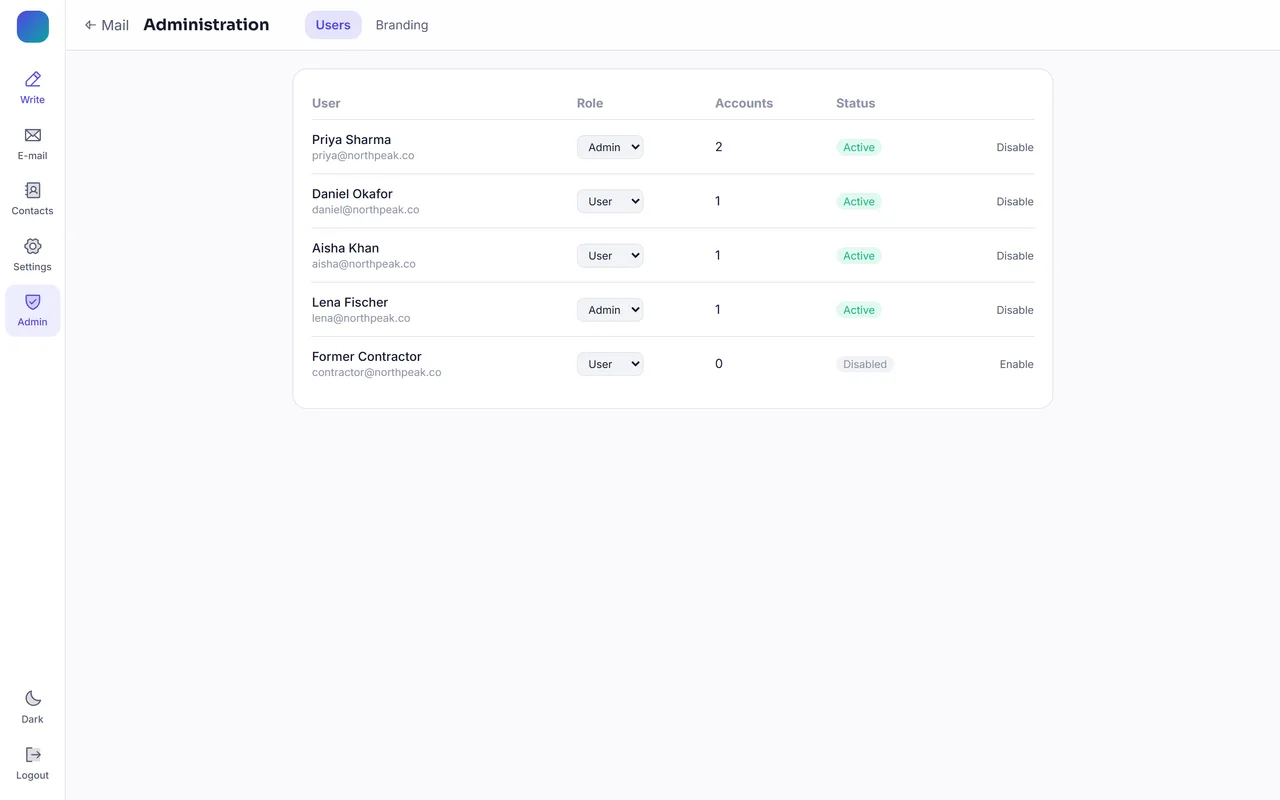
Webmail Client Software — Administration — Users screen Enlarge
Users — roles, status and one-click admin or disable.

Security & deployment

Enterprise-grade security. Installs in minutes.

Encrypted credentials, hardened sessions and tracker-proof mail viewing — deployed by a double-click Windows installer, or with Docker.

Simple Windows deployment

  • Double-click installer sets everything up for you
  • Runs as a Windows Service — starts automatically, no console needed
  • IIS reverse proxy configured automatically (URL Rewrite + ARR)
  • Prerequisites handled — IIS, SQL Server Express and more
  • Docker deployment also available
Technical specifications MailFlow 1.0
Area Details
Protocols IMAP, POP3, SMTP · SSL/TLS, STARTTLS
Real-time IMAP IDLE → Server-Sent Events
Backend ASP.NET 8, MailKit, EF Core
Frontend React 18, TypeScript, Tailwind
Database Microsoft SQL Server (settings only)
Hosting Windows Server + IIS, or Docker
Browsers All modern desktop & mobile browsers

Encrypted credentials

Mail passwords encrypted with AES-256-GCM; app passwords hashed with BCrypt.

Hardened sessions

Short-lived tokens held in memory, with rotating httpOnly refresh cookies and reuse detection.

Tracker & XSS protection

Sanitised, sandboxed HTML; remote tracking pixels blocked; rate limiting and security headers.

FAQ

Webmail Client Software — frequently asked questions

What is MailFlow?

MailFlow is a self-hosted webmail client from Sysfo. It gives users a modern, Gmail-style inbox on top of any existing IMAP, POP3 and SMTP mail server — with no mail migration and no mail stored in MailFlow’s own database.

Which mail servers does MailFlow work with?

Any standards-compliant IMAP / POP3 / SMTP server, including cPanel, Plesk, DirectAdmin, CyberPanel, HestiaCP, hMailServer, Exchange (via IMAP), Dovecot, Postfix and Courier. Auto-discovery finds the hosts, ports and encryption from an email address.

Can I brand MailFlow for each client domain?

Yes. Each domain gets its own branding profile — app name, logo, primary and secondary colours and support email — so visitors on that domain see their own branded webmail from a single installation.

Is my mail stored by MailFlow?

No. Mailbox content is streamed live from your mail server and never copied; MailFlow’s SQL Server database holds settings only. Mail passwords are encrypted with AES-256-GCM.

Does it support real-time new mail?

Yes. MailFlow uses IMAP IDLE and pushes new messages to the browser instantly via Server-Sent Events, with optional desktop notifications.

How is MailFlow installed?

A double-click Windows installer sets up the prerequisites, runs MailFlow as a Windows Service and configures the IIS reverse proxy automatically. A Docker deployment is also available.

Which languages and themes are available?

18 interface languages — including Hindi, Bengali, Tamil, Telugu, Marathi, Gujarati, Punjabi, Kannada and Malayalam — and three themes: Light, Dark and Glass.

Get started

See MailFlow on your own mail server.

Book a live demo or request a trial build branded with your domain. We’ll help you get it running alongside your existing mail setup.

  1. 1
    Live demo

    A walkthrough of the inbox, composer, themes and admin console.

  2. 2
    Branded trial

    A trial build with your domain’s name, logo and colours.

  3. 3
    Go live

    Installed beside your mail server, with your users signed in.

  • Works with any IMAP / POP3 / SMTP server
  • Mail never copied off your server
  • White-label branding per domain
  • Real-time push via IMAP IDLE
  • Light, Dark & Glass themes
  • 18 languages incl. 9 Indian
  • AES-256-GCM encrypted credentials
  • One-click Windows installer
Download the brochureMailFlow sales brochure · PDF, 7 pages, 3.2 MB
Company
Sysfo Software Solutions Pvt. Ltd.
Product
MailFlow — Webmail Client Software

Request a free demo

We reply within one business day. Your details are only used to respond to this enquiry.