
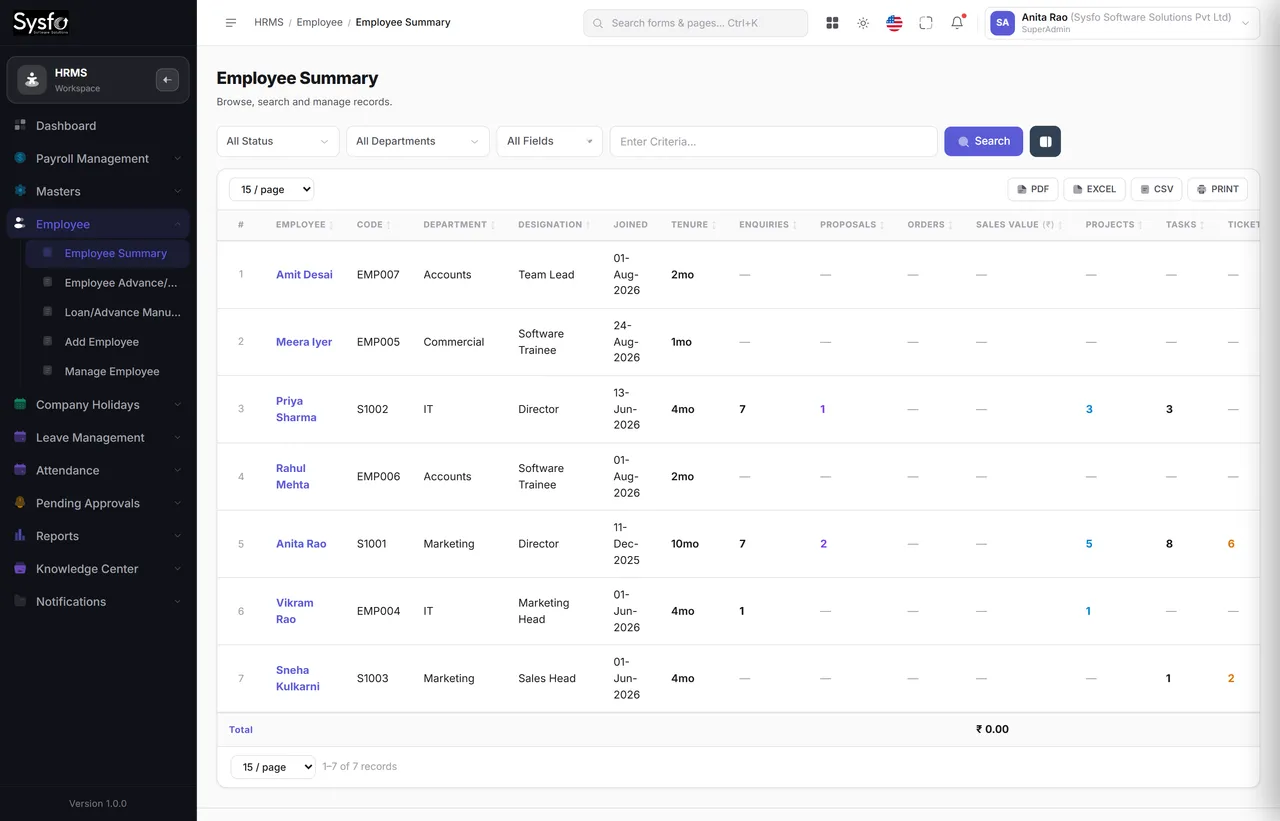
One employee record
Personal details, documents, department, designation, shift, salary structure, assets issued and leave balance — on one screen, in tabs.
Employees, attendance, leave, timesheets, payroll, advances, assets and policy sign-off — one record per person, forty-six screens, and approvals that find the approver.
Why Sysfo HRMS
Most of what HR spends its day on is lookup — what is my leave balance, where is my payslip, who approved this claim. Sysfo HRMS answers those from the employee’s own login, and keeps the records that payroll depends on in the same place.
Personal details, documents, department, designation, shift, salary structure, assets issued and leave balance — on one screen, in tabs.
Leave and timesheets clear two levels; expense claims clear one. Each step notifies the next person by Email, SMS and WhatsApp.
Built mobile-first, so a site engineer applies for leave and a manager approves it without either reaching a desk.
A month in HR
Leave allocated for the year; holidays published.
Attendance marked, or uploaded in bulk.
Timesheets filed and approved at two levels.
Claims and adjustments cleared before cut-off.
Payroll processed from attendance and leave.
Payslips out; advances recovered automatically.
Not to hiring or policy. To answering the same six questions — what is my balance, where is my payslip, did my leave get approved, who has my laptop, when is the holiday, what did I claim. Each is a lookup against data HR already holds.
Those six answers move to the employee’s own login, on a phone. HR stops being the index and goes back to being the function — and payroll gets its inputs without chasing anybody.
The employee record
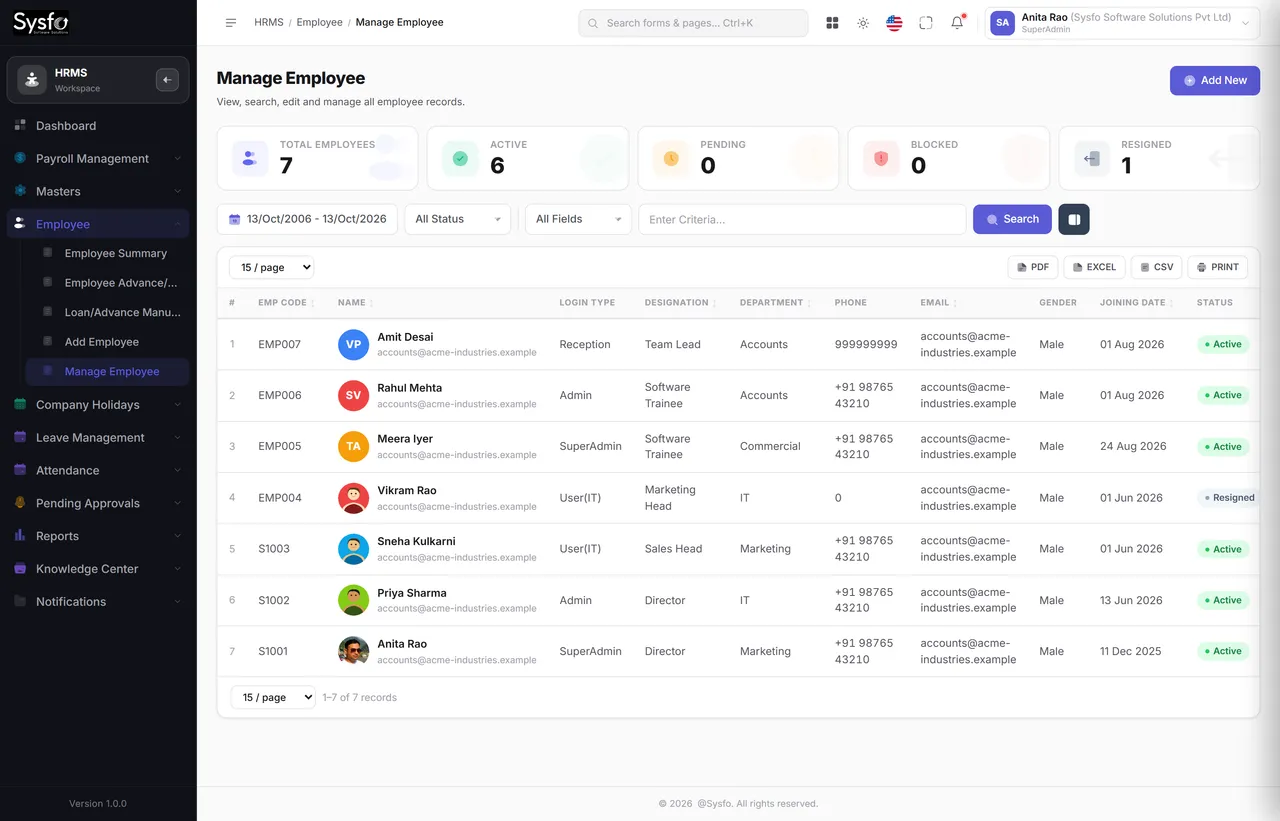
Manage Employee lists everyone with their code, designation, department and status. Open one and Employee Summary gathers what every other module knows about them — attendance, leave, payroll, assets, advances and documents — so a question about a person is answered in one place instead of five.
 Enlarge
Why one record matters
Balance settled against what was allocated.
What they hold is a list, not a memory.
Outstanding balance recovered in the last run.
Anything pending cleared or closed.
Relieving, experience and no-dues issued.
Attendance management
A small office marks a team in one screen. A factory uploads a machine export. A manager fixes yesterday by hand. All of them land in the same record that payroll reads.
Mark a whole team for today in one pass — present, absent, half day, leave — and save once. Shift, holidays and approved leave are applied first.
Correct one person on one date, with the change stamped against whoever made it.
Enter a full period for many employees at once, when a month has to be caught up.
Import from a biometric or spreadsheet export instead of re-keying it.
What it feeds
By team, in bulk, or uploaded.
Attendance Exceptions lists what looks wrong.
Attendance Summary per employee and period.
Payroll reads it directly — no re-entry.
Leave & timesheets
Leave types carry their own rules, allocation is made per employee per year, and the working days between two dates are counted around weekends and company holidays — not by hand.
Nobody chases anybody
Every submission, approval and rejection fires Email, SMS and WhatsApp from templates you control — so a leave request does not sit unseen because someone missed an email.
Your casual leave for 22–24 Oct 2026 has been approved by Vikram Rao. Balance remaining: 3.5 days. — Sysfo Software Solutions
10:18 AM ✓✓Company holidays are published once and respected by leave counting, attendance and payroll — so nobody argues about whether a day was working.
Allocation minus approved leave, shown before the request is submitted — so an employee cannot apply for days they do not have.
Approved timesheets carry activities, which is what lets project and client reporting show what a job actually consumed.
Payroll software
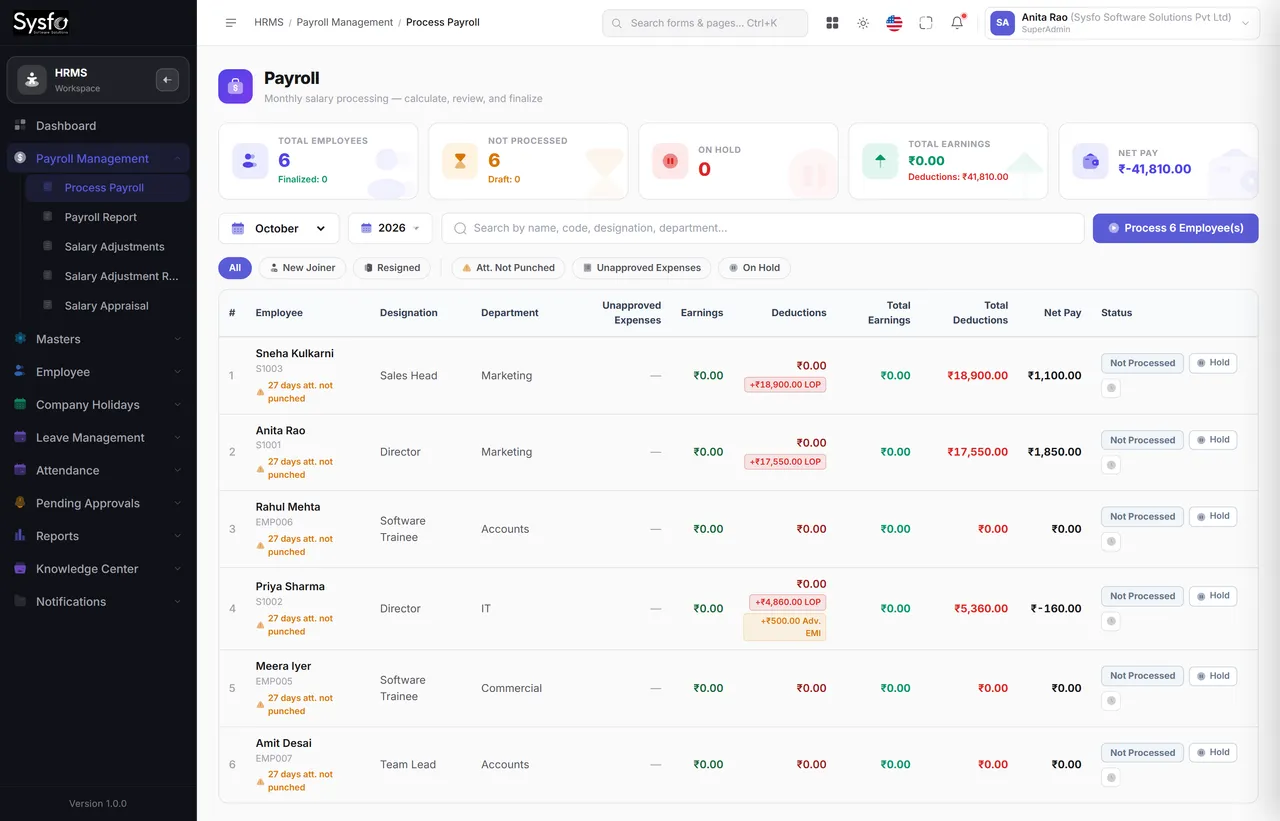
Because attendance, leave, adjustments, claims and advances are all in the system, running payroll is a calculation rather than a collection exercise.
 Enlarge
Before the run
Leave Approvals (L1), Final Leave Approvals, Timesheet Approvals (L1), Final Timesheet Approvals and Pending Expense Claims all sit under Pending Approvals — so the cut-off is a screen somebody clears, not a reminder somebody sends.
A salary appraisal is recorded against the employee with its effective date, so the increase appears in the right month without anyone editing a structure by hand.
An advance or loan carries a balance that payroll deducts each month, with manual payments recorded where somebody repays directly — and an outstanding report that does not depend on a side spreadsheet.
Documents & policy
Six kinds of HR letter, two templates each, all merging the employee’s own details onto one shared letterhead — and a knowledge centre that records who read what.
Staff self-service
The My Account module gives every employee their own profile, attendance, leave application and status, timesheet entry, expense claims, company holidays and assigned reading — included with HRMS, and the reason HR’s inbox gets quieter.
The letters that go out are the ones your HR and legal people wrote, not a vendor’s wording with your logo on it.
Name, designation, dates, salary and address are merged from the employee record — so a letter cannot disagree with the system that produced it.
The acknowledgement report shows who opened a policy and when, which is the part that matters when a policy is ever questioned.
HR reporting
Every report filters by date, employee, department or designation, searches across the columns on screen, lets you pick your columns and exports. Learn one report and you have learnt all fifteen.
Every screen in the module
All forty-six screens. Permissions are set per screen and per action, so a line manager can approve leave without seeing salaries, and a payroll clerk can run the month without editing employee records.
Part of Sysfo ERP
HRMS & Payroll Software runs on its own, or alongside the other Sysfo ERP modules on one login and one set of records.
FAQ
Sysfo HRMS is HR and payroll software that keeps one record per employee — personal details, documents, attendance, leave, timesheets, salary, advances, assets and policy sign-off — and runs payroll from that data. It has 46 screens and 15 HR reports.
Four ways: Quick Attendance for a whole team in one pass, Manual Attendance to correct one person on one date, Bulk Attendance Entry for a whole period, and Bulk Attendance Upload from a biometric or spreadsheet export. All of them feed payroll directly.
Yes. Leave and timesheets clear two levels — L1, then final — and each submission, approval and rejection notifies the right person by Email, SMS and WhatsApp. Working days are counted around weekends and company holidays automatically.
Payroll reads paid days from attendance and approved leave, applies salary adjustments and appraisals, settles pending expense claims and recovers employee advances and loans against their balance, then produces payslips and a payroll report.
Yes. Joining, offer, appointment, relieving and experience letters and no-dues certificates each have two editable templates that merge the employee’s details onto your letterhead.
Yes. The My Account self-service module gives every employee 13 screens — attendance, leave application and status, timesheets, expense claims, holidays and assigned policies — built mobile-first.
Get started
We set up your departments, designations, shifts, leave types and salary structures, bring your employee records across, and train HR and the approvers.
A walkthrough of attendance, leave, payroll and the approval chain.
Masters, leave allocation, salary structures and your existing employee records.
HR, approvers and staff self-service, with support after the first payroll run.