
Customers won't download another app
Asking people to visit an app store and install hundreds of megabytes loses most of them at the first step.
We build progressive web apps (PWAs) that install to the home screen, open full-screen, work offline and send push notifications, from one codebase that runs on Android, iPhone and desktop. It's the fastest route to an app your customers and staff will actually use, from a team with 21 years of web and mobile experience.
When a mobile web app makes sense
Native apps are powerful but expensive to build twice and hard to get people to download. A progressive web app solves many of the same problems for less effort.
Asking people to visit an app store and install hundreds of megabytes loses most of them at the first step.
Separate Android and iOS apps double development, testing and every future change.
Urgent fixes and price changes sit in review queues instead of reaching users the same day.
Field staff and customers in low-signal areas lose their work when the connection drops.
Pages reload on every tap, there's no home-screen icon and nothing brings users back.
Sales, delivery and service teams need a quick mobile app without managing installs on every device.
Mobile web app development services
From customer-facing ordering apps to field-staff tools, our mobile web app development covers design, front end, back end and launch.
Installable, full-screen PWAs with a web app manifest, service worker and app-like navigation.
Read more about Progressive Web App DevelopmentCached screens, local data storage and background sync so the app keeps working without a signal.
Read more about Offline-First AppsWeb push for order updates, reminders and offers on Android, desktop and installed iPhone web apps.
Read more about Push NotificationsAdd install, offline and push features to an existing responsive website or web application.
Bottom navigation, gestures, skeleton screens and transitions designed to feel native on a phone.
Read more about Mobile UI/UX DesignSecure REST APIs, authentication, payments and admin panels powering the web app.
Read more about APIs & Back EndOrder taking, attendance, delivery routes and service checklists for teams on the move.
Package your PWA for listing on Google Play without building a separate Android app.
Monitoring, browser-update testing, new features and performance tuning after launch.
Installable progressive web apps
A PWA is a web application that browsers let users install with a single tap. It opens full-screen with your icon and splash screen, remembers the user's login and updates itself silently whenever you release a change. There's nothing to download from a store and no review queue to wait for.

Offline support & push notifications
Service workers cache the app shell and key data, so screens open instantly and forms can be filled offline, then synced when the connection returns. Web push notifications let you send order updates, delivery alerts and reminders to Android phones, desktops and iPhones where the web app has been added to the home screen.
App-like UI from Sysfo's own products
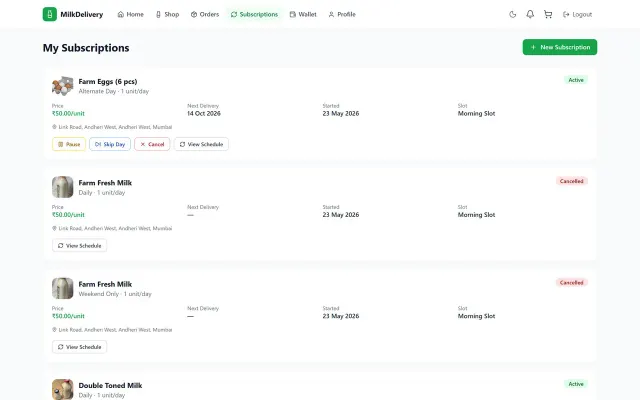
Our milk delivery platform lets customers manage subscriptions, pause or skip deliveries and top up a wallet from a browser, with a clean, app-like interface. We bring the same patterns, such as clear actions, status badges, bottom navigation and fast transitions, to every mobile web app we design.
APIs, payments & admin
Every mobile web app needs a reliable server side. We build REST APIs in ASP.NET Core or Node.js with token-based authentication, integrate UPI and card payments, SMS and WhatsApp messaging and maps, and give your team a web admin panel to manage users, orders, content and reports.
Frameworks & performance
We build PWAs with React, Next.js, Angular or Vue and Workbox for service workers, then test them on the mid-range Android handsets most Indian users actually carry. Code splitting, image optimisation and small bundles keep the first load fast and every later visit near-instant.
What you get
You get a live, installable app on your domain, the admin panel to run it and all the code and documentation, with no per-user licence fees.
Release checks
Release plan
How we build mobile web apps
Short sprints with a working build to try on your own phone every week, and a fixed quote for the first release.
We check whether a PWA, a native app or a hybrid app best fits your users, features and budget.
User flows and a clickable mobile prototype you can test on your own phone before code is written.
Screens, APIs, admin panel, offline and push features delivered in weekly demos.
Android and iPhone handsets, desktop browsers, poor networks and install flows tested and fixed.
Go-live on your domain, optional Play Store listing, then monitoring and new features.
Engagement models
Most clients start with a prototype or a first release, then add features in monthly sprints.
Free
Find out if a PWA suits your idea.
Fixed price
A complete, installable app with back end and admin.
Per project
Add app features to a site you already have.
Monthly
A team that keeps improving the app.
Why Sysfo
Because we build PWAs, native Android and iOS apps and Flutter apps, we recommend the approach that fits, not the only one we know.
We'll tell you plainly when a PWA is enough and when Bluetooth, background tasks or heavy device features need a native app.
Budget and mid-range Android handsets and recent iPhones, on throttled networks, not just a fast laptop.
Front end, APIs, database, hosting and admin panel are designed and built by the same people.
Our delivery, collection and service products are used daily by staff on the move, often on weak signals.
One codebase and no store review means a first release in weeks and fixes the same day.
Source code, domain and server accounts are in your name, with no per-user or per-device licence fees.
FAQ
Mobile web app development is building an application that runs in the phone's browser but looks and behaves like an installed app. Modern mobile web apps are usually progressive web apps (PWAs): they can be added to the home screen, open full-screen, work offline and send push notifications, all from a single codebase that also runs on desktop.
A native app is built separately for Android and iOS and installed from an app store. A PWA is built once with web technologies and installed straight from the browser. PWAs are quicker and cheaper to build and update, while native apps still have deeper access to device features such as Bluetooth, background location and some sensors.
Yes. Safari on iPhone and iPad supports installing a PWA to the home screen, full-screen display, offline caching and, since iOS 16.4, web push notifications for installed web apps. Some features still behave differently from Android, so we design around them and test on real iPhones as part of every mobile web app development project.
It depends on the number of screens and user roles, offline and push requirements, payments and integrations, and the admin panel and reports you need. After a free feasibility call and a review of your requirements, we provide a fixed, itemised quote for the first release, so you know the full cost before development starts.
A typical first release takes six to ten weeks: one to two weeks for user flows and a clickable prototype, four to six weeks of development in weekly sprints, and about a week of real-device testing and launch. Converting an existing website into a PWA can take as little as two to three weeks.
A PWA can be published on Google Play using a Trusted Web Activity, which wraps the web app in a lightweight Android package. Apple's App Store generally requires more native functionality, so for an iOS store listing we usually recommend a hybrid app built with Flutter or React Native. Many businesses simply share an install link instead.
Usually, yes, provided the site is already responsive. We add a web app manifest, a service worker for caching and offline pages, install prompts and, if needed, push notifications. If the site isn't mobile-friendly yet, our responsive website development team rebuilds it first, then we add the app features on top.
You do. On completion we hand over the full source code, API documentation, database and deployment instructions, and the domain and server accounts stay in your name. There are no per-user or per-device licence fees. Many clients keep us on a monthly plan for enhancements, but you're free to take development in-house.
Yes. We are based in Lucknow and provide mobile web app development for startups and businesses across India and abroad. Prototypes and weekly builds are shared by link, so you can try every version on your own phone, and progress meetings happen over video calls.
Plan your web app
Tell us about your app idea, your users and the devices they use. A senior developer will call you back within one business day to discuss whether a PWA, native or hybrid app fits best.