
Enquiries that go cold
Calls, referrals and website enquiries land with whoever picks up, and nobody owns the follow-up until the prospect has hired someone else.
Practice-management software for consultancies, CA and law firms, architects, agencies and IT service companies: enquiries, proposals, projects, timesheets, GST billing, expenses and client support on one login. From a Lucknow software company that has run its own client projects for 21 years.

Challenges for professional firms
In a firm that sells expertise by the hour or by the engagement, every untracked hour, late invoice or forgotten follow-up comes straight off the bottom line.
Calls, referrals and website enquiries land with whoever picks up, and nobody owns the follow-up until the prospect has hired someone else.
Quotations are rebuilt from old Word files, with stale fees, outdated terms and sometimes the previous client's name on page three.
Without reliable timesheets, partners cannot see where time goes, which engagements overrun or which clients are unprofitable.
Monthly retainers, AMCs and annual compliance engagements are invoiced late or not at all, and receivables quietly age past 90 days.
Travel, filing fees and client expenses are claimed on paper, approved late and rarely recovered from the client.
Client questions and document requests sit in personal inboxes, with no record of who is handling them or how long they have waited.
Professional services software solutions
Sysfo ERP covers the whole client lifecycle with ready modules you switch on as you need them; we add client portals and custom workflows where your practice is different.
Every call, referral and web lead owned by a handler with a callback date, and source-wise conversion reports.
Read more about Enquiry & Lead ManagementProposals assembled from reusable pages and themes, with fees, GST, validity dates and a win-rate pipeline.
Read more about Proposal ManagementEngagements with budgets, teams and progress, task boards and client-wise reporting.
Read more about Project & Engagement ManagementDaily timesheets against projects, approvals, and utilisation by person, team and client.
Read more about Timesheets & UtilisationMilestone, part and recurring invoices with SAC codes, TDS on receipts, renewals and receivables ageing.
Read more about Retainer & GST BillingEmployee claims and vendor bills approved before they are paid, with client-wise recovery and ITC.
Read more about Expense ManagementClients raise and track requests from their own panel, with an owner and an SLA on every ticket.
Read more about Client Helpdesk & PortalOne record per professional, from joining to exit: attendance, leave, appraisals and payroll.
Read more about HRMS & PayrollDocument collection portals, compliance calendars and practice-specific workflows built for your firm.
Read more about Custom Portals & Workflows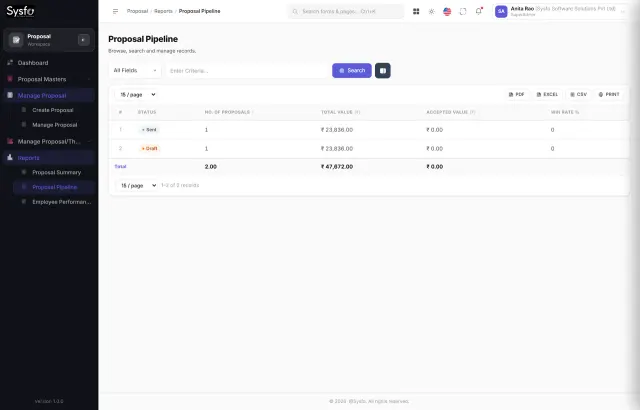
Enquiries, proposals & pipeline
Every enquiry is logged with its source, assigned to a partner or manager, and given a callback date. When the client is ready, a proposal is assembled from your approved pages — firm profile, approach, team, fees and terms — rather than copied from the last one. The pipeline shows what is out, what is close and who is winning, and an accepted proposal becomes the engagement without re-typing.
Projects, timesheets & utilisation
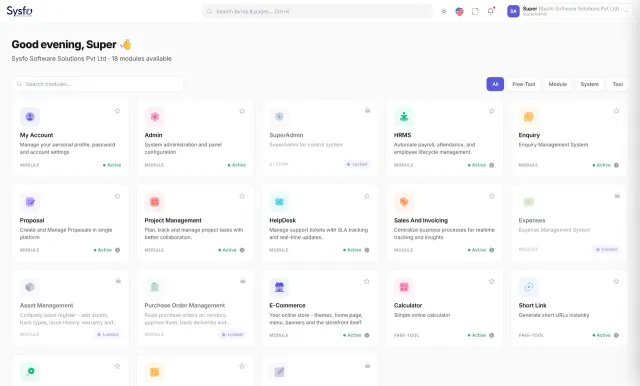
Each engagement gets a budget, a team and a task board. Professionals fill short daily timesheets against the engagements they work on, managers approve them, and partners see utilisation, budget versus actual and client-wise effort without chasing spreadsheets. Overruns show up while there is still time to talk to the client.
Retainer, milestone & GST billing
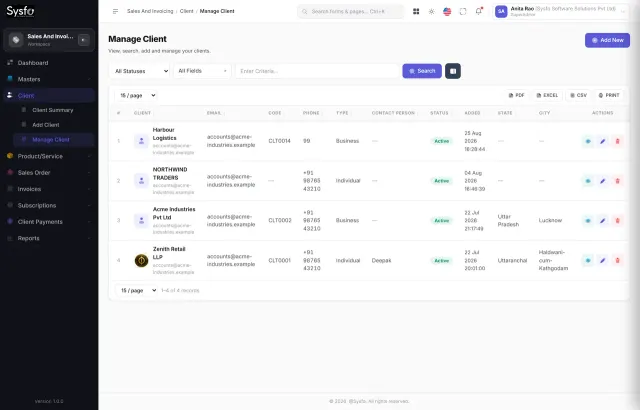
Professional fees are rarely billed in one go. Raise milestone and part invoices against an engagement, set up monthly retainers and annual renewals so they are never forgotten, and record receipts with TDS deducted by the client. Receivables ageing and the client ledger show exactly what is outstanding and for how long.
Expenses & claims
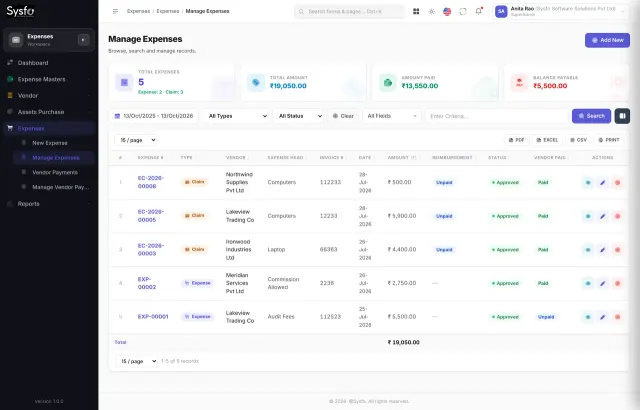
Travel, filing fees, courier and out-of-pocket costs are claimed from a phone with the receipt attached, approved by the right person and tagged to the client or engagement. Vendor bills go through the same approval, so nothing is paid twice, and input tax credit and reverse charge are recorded as you go rather than reconstructed at return time.
Client helpdesk & portal
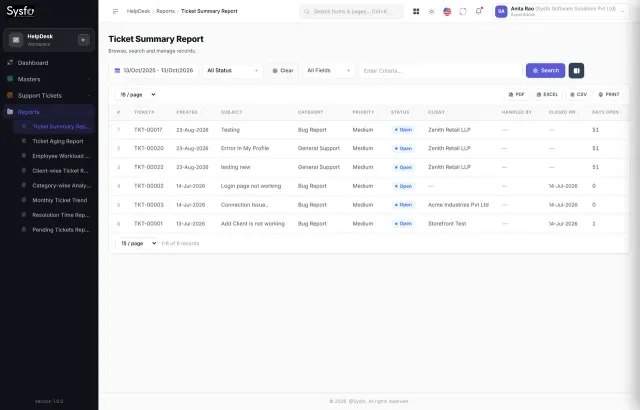
Clients log in to their own panel to raise requests, upload documents and see the status of their tickets and invoices. Every request has an owner and an SLA, alerts go out by Email, SMS and WhatsApp, and partners see ageing and workload across the firm — so client service no longer depends on one person's inbox.
What you get
A professional services software project with Sysfo ends with your partners, managers and staff working on the new system, with your data and templates in place.
Firm KPIs this quarter
Rollout plan
How we implement
We work around your busy season — audit, filing or year-end — and switch modules on in a sensible order, starting with the one that recovers the most fees.
A live demo of Sysfo ERP using examples from your kind of practice, and a conversation about where time and fees leak today.
We map how you win, deliver and bill work, decide which modules fit and give you a fixed, itemised quote.
Modules, templates, approval chains and access are set up; portals and custom workflows are built with weekly demos.
Clients, engagements, staff and balances are imported, and each role is trained on real work.
Go live module by module, with support under agreed SLAs and new reports as the firm grows.
Ways to work with us
Many firms begin with enquiries, proposals and billing, then add timesheets, expenses and the client helpdesk once the team is comfortable.
Free
See the software on examples from your practice.
Fixed price
Ready modules configured for your firm.
From a quote
For practice-specific needs a product cannot cover.
Monthly
Keep the system running and improving.
Why Sysfo for professional services
We use proposals, timesheets, retainers and client tickets in our own business every day, so we know which details matter.
Enquiry, proposal, engagement, timesheet, invoice, receipt and client ticket share one client record — nothing is re-typed between tools.
Reusable pages and themes keep every proposal on-brand and up to date, however many partners send them.
GST with SAC codes, TDS on receipts, input tax credit and reverse charge are built in, so your accounts team is not fixing invoices.
Proven Sysfo ERP modules go live in weeks; custom development is reserved for what makes your practice different.
Role-wise access per screen and action, audit trails and NDAs, because client files and fees are sensitive.
A Lucknow team in business since 2005, supporting firms across India and abroad long after go-live.
FAQ
Professional services software, sometimes called PSA or practice-management software, runs a firm that sells expertise: enquiries and CRM, proposals, engagements and projects, timesheets and utilisation, billing and retainers, expenses, client support and HR. It gives partners one view of pipeline, workload and fees instead of separate spreadsheets, email folders and accounting entries.
Our professional services software suits consultancies, chartered accountant and tax firms, law firms, architects and interior designers, engineering consultants, marketing and creative agencies, training companies and IT service firms. Anyone who wins work through proposals, delivers it through people's time and bills by milestone, retainer or hour will find the workflow familiar.
It depends on the number of users and modules, and on whether you need a client portal or custom workflows. Ready Sysfo ERP modules cost far less than a fully custom system, and you can start with only the modules you need. After a free demo and workflow review, Sysfo gives you a fixed, itemised quote before anything starts.
Ready modules such as enquiries, proposals, billing and expenses typically go live in two to six weeks, depending on how quickly templates and data are ready. Projects, timesheets and a client helpdesk can follow in a second phase. Custom portals usually add a few weeks more. We schedule around your busy season.
Yes. You can raise part and milestone invoices against an engagement while the system tracks what is ordered, billed and remaining; set up monthly retainers and annual renewals with expiry alerts; and record receipts with TDS deducted by the client. GST invoices carry SAC codes, and receivables ageing shows what is overdue.
Yes. Staff fill daily timesheets against engagements from a laptop or phone, managers approve them, and partners see utilisation by person, team and practice area, along with budget versus actual effort on each engagement. That is usually the fastest way a firm finds unbilled hours and unprofitable clients.
Yes. Clients can log in to their own panel to raise requests, track tickets and view invoices, and we can add document upload, compliance calendars or status tracking for your practice. A client portal cuts down on status-update emails and gives your firm a more professional face.
Yes. Access is controlled per screen and per action, so staff see only what their role needs, and changes are logged. Data is encrypted in transit, backed up regularly and hosted securely. We sign an NDA before implementation, and your data remains yours to export at any time.
Yes. Many firms keep Tally or their existing accounting package for the books. Our professional services software can pass invoices, receipts and expenses across so they are not entered twice. Alternatively, Sysfo ERP's own billing, receivables, payables and ledgers can cover day-to-day accounting needs.
Talk to a practice software expert
Tell us about your practice — services, team size, branches and the tools you use today. A consultant will call you back within one business day to arrange a free demo on examples from your own workflow.