Software
School Management Software: Features, Benefits and Cost (2026 Guide)
Running a school today means managing admissions, attendance, fees, exams, timetables, transport and parent communication, often across registers, spreadsheets and WhatsApp groups. As student numbers grow, small gaps turn into big problems: missed fee follow-ups, late report cards and parents who feel out of the loop.
Running a school today means managing admissions, attendance, fees, exams, timetables, transport and parent communication, often across registers, spreadsheets and WhatsApp groups. As student numbers grow, small gaps turn into big problems: missed fee follow-ups, late report cards and parents who feel out of the loop.
School management software brings all of this into one system, so the office, teachers, students and parents work from the same up-to-date information. It is also called a school ERP or school administration software.
This guide explains the modules a good system should have, the benefits for each user, what it costs, and how to choose the right software for your school.
What Is School Management Software?
School management software is a web and mobile platform that automates a school's daily administration. The admin office uses it for admissions, fees and records. Teachers use it for attendance, homework and marks. Parents and students use an app to see attendance, fee dues, results and notices in real time. Because everything is in one database, reports that took days can be produced in a few clicks.
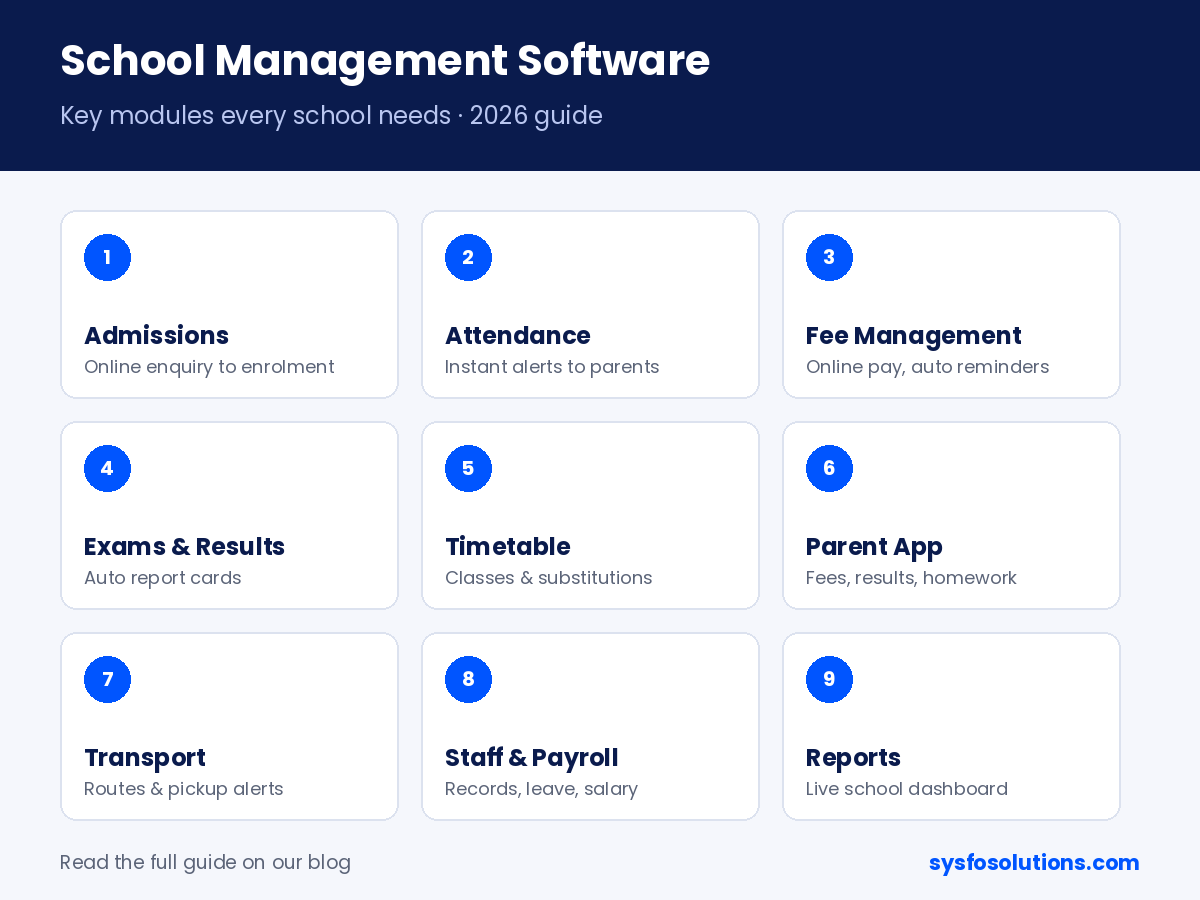
Key Modules of School Management Software
[Featured image yahan lagao: school-management-software-2026.png]
Module | What it does |
|---|---|
Admissions & enquiries | Online enquiry forms, admission workflow, document upload and student profiles |
Student information | One record per student: personal details, class, section, siblings, history |
Attendance | Daily or period-wise attendance by teachers, with instant absence alerts to parents |
Fee management | Fee structures, concessions, online payment, receipts, dues reminders and collection reports |
Exams & report cards | Marks entry, grading rules, report card generation and result analysis |
Timetable & classes | Class and teacher timetables, substitutions and subject allocation |
Homework & learning | Assignments, study material and submissions shared through the app |
Parent & student app | Attendance, fees, results, homework, notices and messages on the phone |
Transport | Routes, stops, vehicle and driver details, transport fees and pickup alerts |
Staff & payroll | Staff records, attendance, leave and salary, often linked to an HRMS |
Library & inventory | Book issue/return, fines, and stock of school supplies |
Reports & dashboard | Live view of admissions, attendance, fee collection and academic performance |
Benefits for Everyone in the School
For school owners and principals
- See fee collection, admissions and attendance on one dashboard, any time.
- Fewer fee defaults, because reminders and online payment links go out automatically.
- Better decisions from real data instead of month-end registers.
For the admin office
- Admissions, receipts and certificates generated in minutes, not hours.
- No duplicate data entry across registers and spreadsheets.
- Every payment and change recorded with who did it and when.
For teachers
- Attendance and marks entered from a phone in a few taps.
- Report cards calculated automatically from the school's grading rules.
- Homework and notices shared with a whole class at once.
For parents and students
- Attendance, results, fees and homework visible on the app the same day.
- Online fee payment without standing in a queue.
- Direct, organised communication with the school instead of scattered WhatsApp messages.
How Much Does School Management Software Cost?
Pricing usually follows one of three models:
Pricing model | How it works | Best for |
|---|---|---|
Per-student yearly subscription | A fixed amount per student per year; hosting and updates included | Schools that want low upfront cost |
Yearly plan by school size | Flat yearly fee based on number of students or branches | Single schools with stable strength |
One-time licence + customisation | Pay once, set up with your school's branding, fee rules and report card format; yearly support optional | Schools and groups with their own processes or multiple branches |
The real cost depends on modules (transport, payroll, library), number of branches, and whether you need a branded parent app. Always ask for a quote that lists modules, users, data migration, training and support.
How to Choose the Right School Software
- Fits your fee structure: concessions, sibling discounts, late fees and instalments.
- Matches your report card format: CBSE, ICSE, state board or your own grading.
- Easy for teachers: if marking attendance takes more than a minute, adoption will fail.
- Good parent app: fast, simple, in the language parents use.
- Data migration help: existing student and fee data should move in without retyping.
- Data security and ownership: role-based access, backups, and the ability to export your data.
- Training and support: on-site or online training for staff, and quick help during admissions and exam season.
- A live demo first: ask to see it with your own fee structure and a sample report card.
Frequently Asked Questions
What is the difference between school management software and a school ERP? They usually mean the same thing. "School ERP" is often used when the system also covers finance, payroll, inventory and multiple branches.
Is school management software suitable for small schools? Yes. Small schools benefit most from automated fee reminders, attendance alerts and ready report cards, because they have fewer staff to do this work by hand.
Can parents pay fees online through the software? Yes, when it is integrated with a payment gateway. Parents pay from the app or a link, and the receipt and fee ledger update automatically.
How long does it take to set up? A standard setup with your classes, fee structure and student data can usually be done in a few weeks, depending on data migration and training.
Is our student data safe? It should be. Look for role-based access, encrypted logins, regular backups, and a clear agreement that the school owns its data.
See EdPro Suite with your school's data
Sysfo's School Management Software – EdPro Suite covers admissions, attendance, fees, exams, timetable and a parent app, set up with your school's fee rules and report card format. Book a free demo and we'll walk you through it.